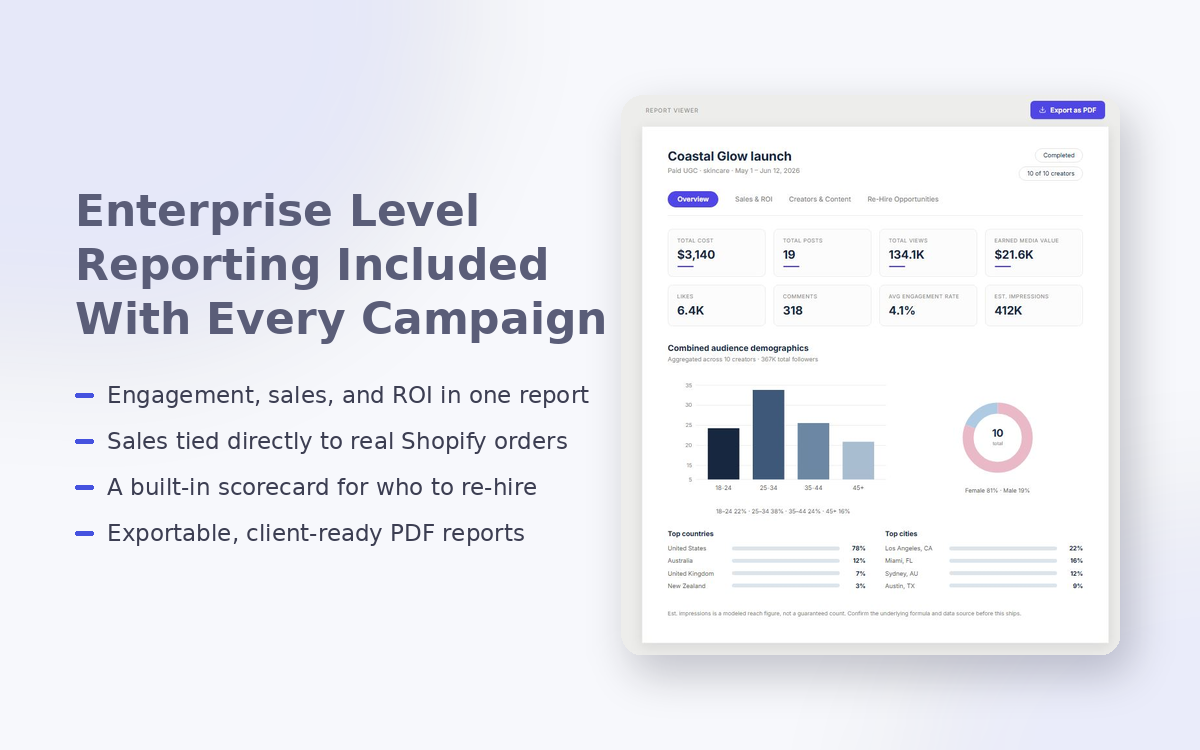
A campaign ends and someone asks you how it performed. Most influencer marketing reporting means pulling engagement numbers from each platform, checking Shopify separately for sales, and combining the two yourself before you can say anything with confidence. CleerCut builds that report for you automatically once your creators have posted, so the answer is already available rather than something you have to assemble.
What You Get on Every Completed Campaign
Once a campaign is completed, a full report becomes available covering the whole thing at a glance: total cost, total posts, total views, and earned media value, alongside likes, comments, and average engagement rate and more. Audience data is also included, broken down by age, gender, and your top countries and cities, so you're not just seeing how a campaign performed but who it actually reached.
This part of the report exists for every campaign, gifted or paid. You don't have to have sales tracking switched on to get a clear picture of reach and engagement.
If You're Tracking Sales, the Numbers Go Further
For campaigns where sales attribution is turned on, whether that's a discount code, a tracked link, or a gifted product with tracking enabled, a second layer of the report opens up. Total sales, average order value, total orders, conversion, ROI, and cost per sale all appear, broken down by creator so you can see who actually drove revenue rather than just who posted. This is the same Shopify order data your campaigns already track, pulled straight into your report rather than living in a separate dashboard.
If a campaign doesn't have tracking enabled, that section simply isn't there. It won't show up half-filled or padded with placeholder numbers. A report showing sales data for a campaign that was never set up to track sales would be more misleading than useful, so CleerCut doesn't generate one.
Every Creator's Real Performance, Not Just the Highlights
The full creator roster shows up in the report, not a trimmed top-performer list. If thirty creators were part of a campaign, all thirty appear, with views, engagement rate, and cost per engagement for each one. You also get a platform breakdown showing how each channel performed, and a ranked list of your ten best performing individual posts by views.
That distinction matters more than it might sound like. A campaign report that only surfaces your five best creators tells you who to work with again. It doesn't tell you where the budget actually went, or whether a handful of quieter creators were carrying more of the campaign than you'd assumed.
Numbers You Can Actually Stand Behind
This level of detail, safeguards included, is normally something you'd only find on enterprise-tier reporting platforms with a much steeper price tag attached. CleerCut builds it in as standard.
Here's the specific problem it solves. ROI figures in influencer marketing tools are only as reliable as the cost data feeding them, and when a product cost is missing or unset, an unguarded calculation can produce numbers that look impressive and mean nothing. A campaign showing several hundred percent ROI because a cost field was never filled in isn't a good result. It's a broken one that happens to look like a good result.
CleerCut is built around that specific failure mode. If a creator's cost basis is missing or zero, the report shows that field as unavailable rather than computing a number from it. A number that looks good in a screenshot isn't worth much if it's not one you can actually stand behind in front of a client, and CleerCut won't hand you one that isn't. The same principle runs through how CleerCut verifies creator data in the first place: a number that isn't real doesn't belong in a report just because it's easy to calculate.
Helping You Decide Who to Work With Again
The last section of the report answers a different question than the rest of it. It's not asking how the campaign performed. It's asking which of these creators you should hire again.
Each creator gets a Rehire Score built from how they actually performed on that campaign: how cost-efficient they were, how you rated them, whether they delivered on time, how much revision their content needed, and how responsive they were to work with. The score reflects how this specific group of creators performed against each other, not some abstract industry standard, so it's a genuinely useful signal rather than a generic grade.
This is the one part of the report that isn't pulled from social platform data at all. It comes from the same contract, timeline, and communication history CleerCut already tracks for every creator relationship, data that a tool without that infrastructure simply doesn't have access to. You can also attach your own private notes to each creator, visible only to your team, so context from the campaign doesn't get lost between one project and the next.
Reporting You Can Actually Hand Someone
Every number in the report ties back to real order and engagement data, not estimates, which means it's built to be shown to someone else, whether that's a client, a founder, or your own finance team. Engagement data and sales data don't update on the same schedule, so the report states both separately rather than implying a single freshness for everything, and it doesn't quietly reconcile refunds into the sales total either. Anyone reading the numbers knows exactly how current they are and what they do and don't include, rather than taking your word for it.
Frequently Asked Questions
Does every campaign get a full report, even gifted ones with no sales tracking?
Yes. Reach, engagement, and audience data are included on every completed campaign. Sales and ROI data only appear if tracking was enabled for that campaign.
Can I see every creator's performance, or just the top performers?
The full roster is included, uncapped. A thirty-creator campaign shows all thirty, not a shortened list.
How is the Rehire Score calculated?
From how each creator actually performed on the campaign: cost efficiency, your own rating, on-time delivery, revisions required, and responsiveness, scored relative to the other creators in that campaign.
What happens if a creator's cost data is missing?
Any metric that depends on cost, including ROI, is shown as unavailable for that creator rather than calculated from a missing or zero figure.
Can I download the report to send to a client?
Yes. A PDF export is available directly from the report view, built from the same data as the in-app version.
To see how influencer marketing reporting works alongside CleerCut's Shopify integration, escrow payments, and automated CRM, visit cleercut.com.